PitchTrack feature
Personalised broadcasts, right from Gmail
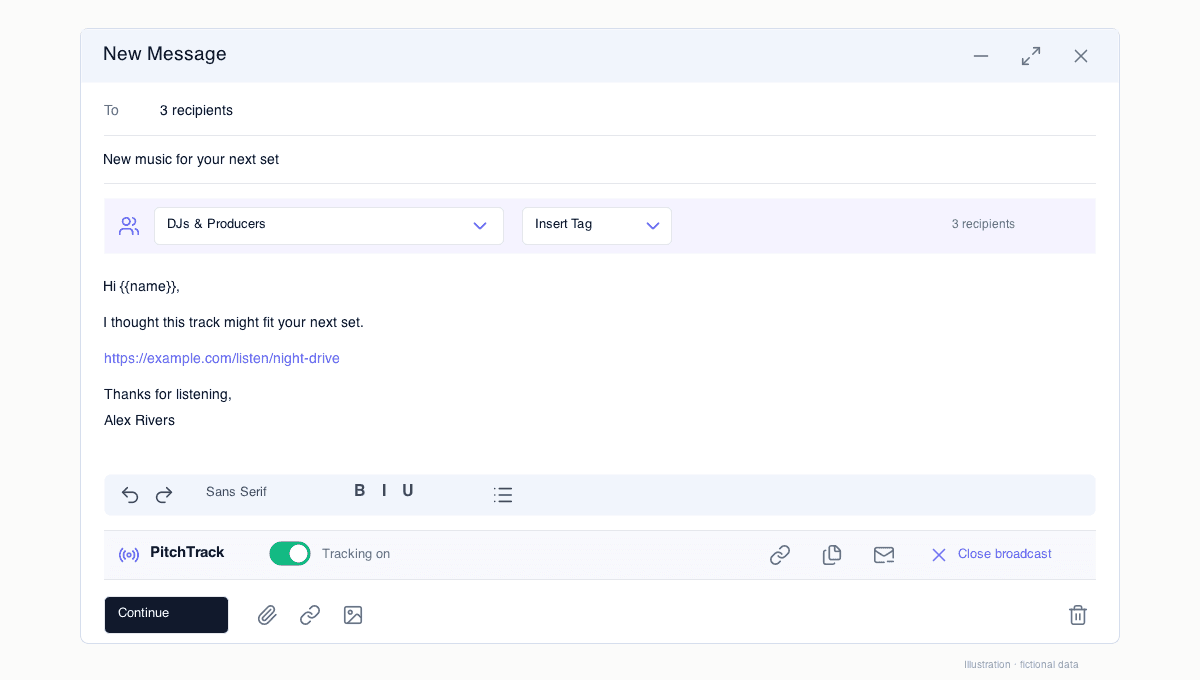
Prepare your message once, personalise it for your audience and send individual emails from Gmail. Spend less time rebuilding the same promo.
Updated
- Audience
- Saved contacts and groups
- Personalisation
- Contact details in each message
- Insights
- Recipient status, opens and clicks
Build your send around the right contacts
Choose an audience from Contacts instead of pasting a long BCC list. Keep different groups for release promos, press pitches, radio contacts or industry announcements.
Reuse the structure, keep the personal detail
Insert a saved template, add supported contact tags and review your message before confirming. Broadcasts send one by one as individual emails, rather than revealing your list in a group email.
Open the broadcast for the full picture
Click a broadcast in your dashboard to review delivery status, recipient activity and link results. Export your report when you want to work with it elsewhere. Sending settings remain subject to Google account limits.
Questions
Which plan includes broadcasts?
Broadcast sending is a Pro feature. The free plan lets you try email tracking before upgrading.
Is an unsubscribe link added automatically?
No. You choose whether to insert it from the toolbar. PitchTrack does not block a broadcast simply because it is missing; you remain responsible for the opt-out requirements that apply to your message.