Save the structure you repeat
A reusable introduction, listening link, and sign-off can save time. Start with a few templates for genuinely different situations, such as a DJ promo, a label submission, and a relevant follow-up.
Give each template a name that tells you when to use it. A template called “Label demo - first contact” is easier to find than “Version 7”.
Use the compose toolbar
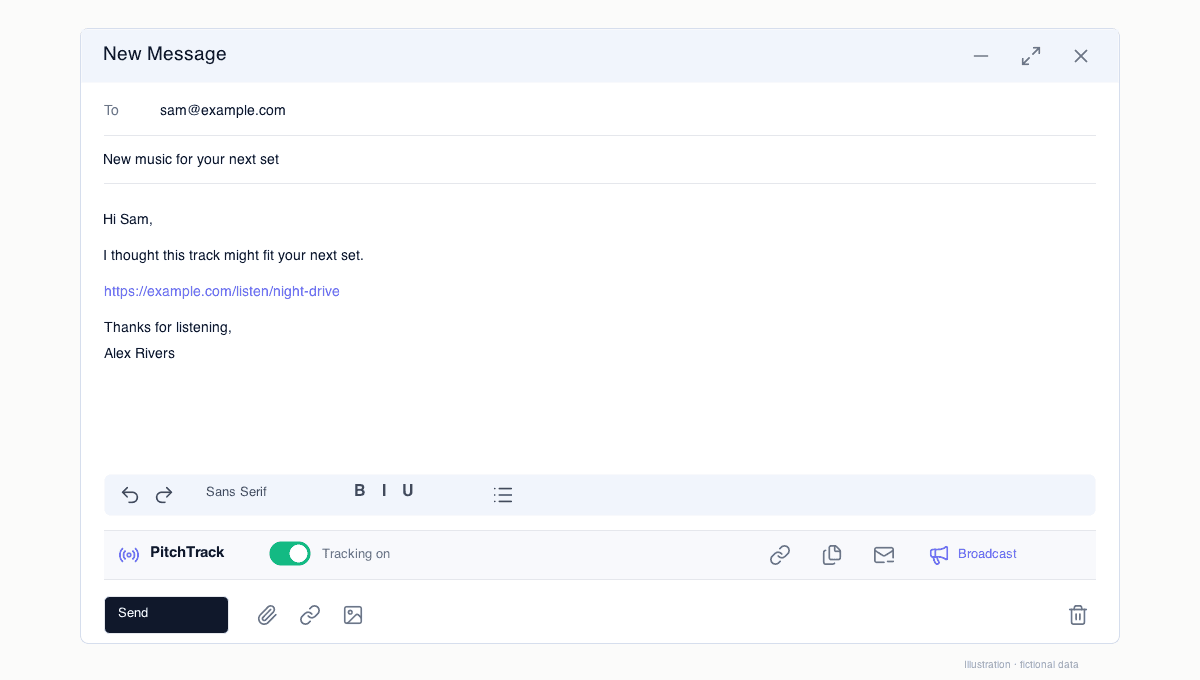
Open a Gmail draft and select Templates in the PitchTrack toolbar beneath the formatting controls. Review the inserted message rather than assuming it is ready to send.
For broadcasts, Insert Tag can use a contact field. Check the recipient preview and missing fields before confirmation.
Keep one clear request
Ask for a listen, feedback, or a conversation, not all three at once. Explain why this particular recipient is relevant.
On eligible tracked Pro sends, ordinary website links are tracked automatically. The Tracked Link tool is not required for every URL.
Review instead of multiplying versions
Keep templates that you actually use and update outdated details. Check listening access, dates, names, and the signature each time.
Tracking alone cannot tell you which wording worked. Use replies, conversations, and repeated patterns rather than one unusually high open count.
A useful template review
Take one saved label-submission template and read it as though you were its next recipient. Can they tell who you are, why this music fits and where to listen? Replace any statement that only applied to the last release.
Keep separate templates for a release announcement and a booking enquiry. Changing a name is not enough when the purpose of the message is different.
- Update the listening destination and access settings.
- Check dates, availability and any repeated artist information.
- Use the recipient preview when inserting broadcast tags.
Open the step-by-step guide
Step-by-step setup and troubleshooting guides.
Prepare your next pitch
Keep your contacts, templates and outreach together in PitchTrack.